

How to Create an AI: What It Actually Takes to Build One

Published on 27 July 2026
Business AI Agents logo
Dr. Shadi Ghaith Founder, Business AI Agents ·

Ask how to create an AI in 2026 and the honest answer is that you almost never train a model from scratch. You pick one narrow job, choose an existing model, write clear instructions, connect the tools it needs, then test it against real past work before letting it loose. The job definition is the hard part.

Business owner choosing between three routes to creating an AI: a robot, modular blocks and a ready-made app
Three routes, one question: which of these did you actually mean?

What people mean when they ask how to create an AI

Friday, 5.50pm, a four-partner solicitors' firm. The practice manager is going through the week's new enquiries: 31 of them, and 11 have had no reply. Not because anyone is lazy — because each one needs somebody to read it, work out whether it's conveyancing or probate or a wrong number, check for a conflict, and write back. That is fifteen minutes each, and nobody has had a spare fifteen minutes since Tuesday.

One of the partners says the thing that everybody says: "Can't we just build our own AI to do this?"

It's a fair question, and it sends people straight to a search engine, where the top results explain how to collect a dataset, engineer features, pick an algorithm, train a model, and tune the hyperparameters. All of that is genuinely how a machine-learning model gets built. Almost none of it is what the firm needs. They don't want a model. They want the enquiries answered by Monday.

The three routes, and which one you actually need

"Create an AI" covers three very different jobs. Picking the wrong one is the single most expensive mistake in this whole field, so it's worth thirty seconds of honesty about which one you're in.

RouteWhat it actually involvesWho it suitsRealistic timescale
Train a model from scratchGathering and labelling your own data, choosing an algorithm, training, evaluating, hosting and retraining it foreverOrganisations with a genuinely unique dataset and people whose job title is "data scientist"Months, and it never really finishes
Assemble an agent on an existing modelWriting instructions, connecting your systems as tools, testing against real past cases, adding review rulesAlmost every small and medium business, for almost every jobDays to a few weeks per job
Configure something already builtSwitching features on, importing your data, setting a few rulesJobs an off-the-shelf product already solves wellHours

Read the middle row twice. That's where the answer lives for the overwhelming majority of UK businesses, and it's the row the search results skip. You are not creating intelligence. You are hiring some, cheaply, from a model that already exists, and then doing the actual work: telling it precisely what your business needs done and giving it the keys to do it.

Why so many of these projects get cancelled

UK businesses are past the wondering stage. The Office for National Statistics found that around 35% of UK businesses with 10 or more employees were using at least one AI technology by June 2026 — up from roughly 12% three years earlier — with large language models the most common at 18%. For a four-partner firm on a street with six other four-partner firms, that means two of them are already doing something.

Doing something is not the same as doing something that works. Gartner predicts that over 40% of agentic AI projects will be cancelled by the end of 2027, blaming "escalating costs, unclear business value or inadequate risk controls". The same analysis is blunt about the market: much of what's sold as an AI agent is what Gartner calls "agent washing" — older chatbots and automation rebranded — and of the thousands of vendors claiming the label, it reckons only about 130 are the real thing.

MIT's Project NANDA put a harder number on it in The GenAI Divide (2025): across 300 disclosed deployments, 52 executive interviews and 153 survey responses, 95% of generative AI pilots showed no measurable impact on profit and loss.

Those three findings agree on the cause, and it isn't the technology. Projects die when nobody wrote down what the AI was for. The firm above has an advantage most enterprises don't: it can describe the job in one sentence. Read the new enquiry, work out what it's about, check we can act, draft the reply. That sentence is worth more than a data science team.
Need Help with AI Solutions?

Get in touch with our team or try our AI assistant.

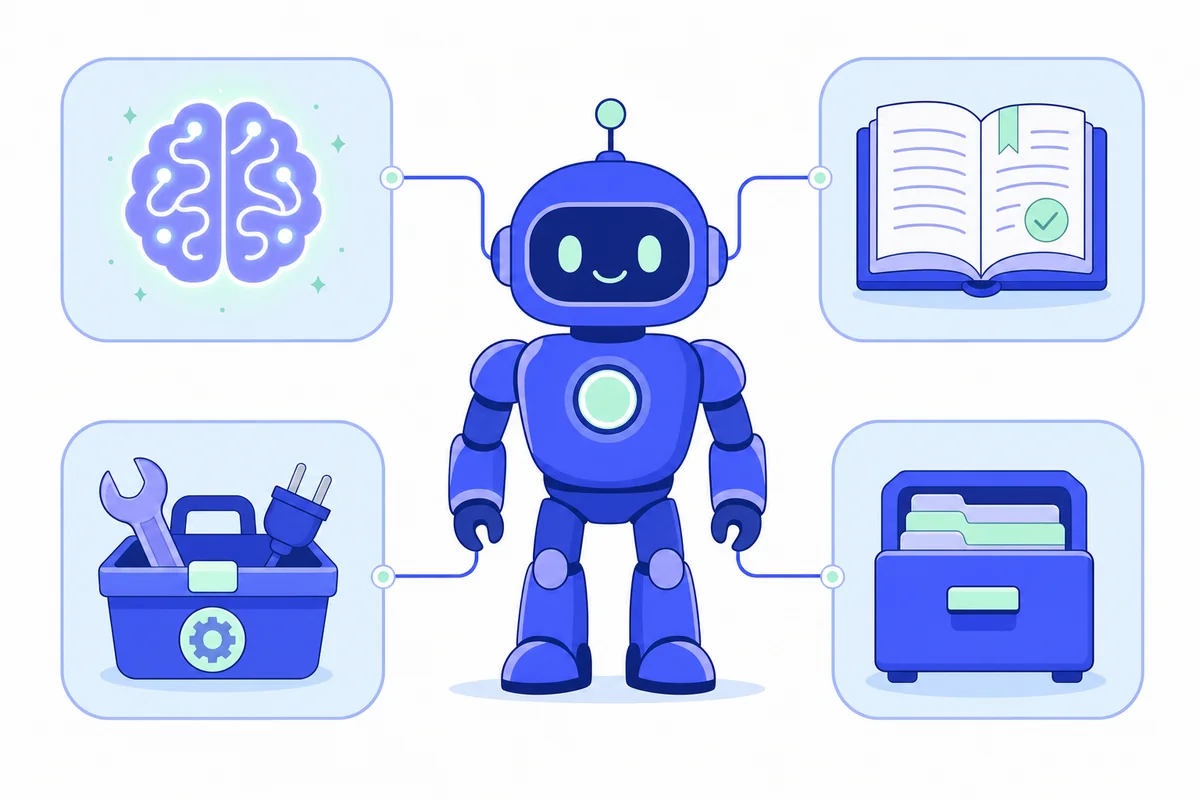
Diagram of the four parts of an AI agent: model, instructions, tools and memory connected to a robot
Four parts, and only one of them comes out of a box.

How to build an AI agent: four parts and seven steps

An AI agent is a model that has been given a job, a set of tools, and permission to use them. Where a chatbot answers, an agent acts: it reads the enquiry, looks the client up, checks the diary, drafts the reply and files the record. Four components make that possible, and you supply three of them.

The four parts of an AI agent

PartWhat it isWho provides itWhat happens without it
The modelThe reasoning engine — it reads, understands and decides what to do nextBought, by the request, from a providerNothing works
The instructionsWritten rules: the job, the tone, the limits, when to stop and ask a humanYouIt's fluent, confident and wrong in ways nobody predicted
The toolsConnections to your real systems — diary, inbox, case management, CRMYouIt can talk about booking the appointment but can't book it
The memoryA record of what it has already seen and doneYouIt greets the same client as a stranger every time

The reason people get stuck is that they spend their effort on the row they don't own. Choosing between models is a decision worth about ten minutes; the models are close in quality and you can swap later. The instructions, the tools and the memory are where the entire result lives, and none of them come out of a box.

The seven steps to create an AI agent

This is the sequence we follow, in order, whether the job is a solicitor's intake or a plumber's phone. Skipping step two is how you end up in Gartner's 40%.

  1. Pick one job, narrowly. Not "handle enquiries" — "read a new enquiry email, classify it by matter type, and draft a first reply for approval". If you can't describe it in one sentence, it's still too big. An agent that does one thing properly beats one that does six things unreliably, and you can always add the seventh later.
  2. Write down what "done" and "wrong" look like. What must be true for a reply to be sent as-is? What must never happen — quoting a fee, giving advice, replying to an existing client's live matter? This is the step everybody skips and the only one that makes the rest measurable.
  3. Choose the model. A current frontier model for anything involving judgement or client-facing language; a smaller, cheaper one for sorting and tagging. You'll run high volumes through the second kind, so the split matters more than the brand.
  4. Give it tools, not a copy of your data. Read access to the case system, the diary, the contacts. An agent that queries the live diary is right; one working from last month's export is confidently, invisibly wrong.
  5. Write the instructions like an induction. The way you'd brief a capable new starter on day one: what we do, how we speak, what to do with the awkward ones, and when to put it down and fetch a human. Include the examples. Especially include the awkward ones.
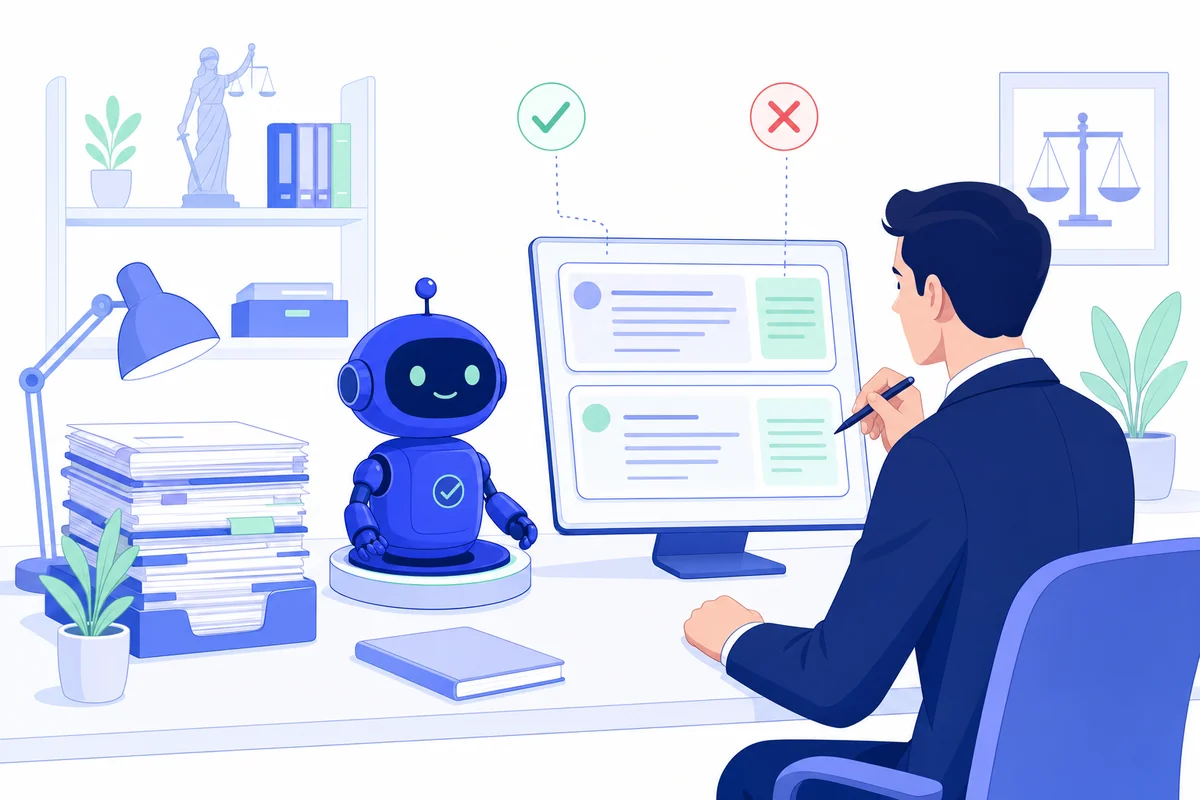
  6. Test it on real past work. Take the last 50 enquiries you already answered, run them through, and compare. Not five — fifty. The failures are never where you expect: for us it's usually the one-line email that says "following on from our chat" and nothing else.
  7. Deploy with a human in the loop, then measure. Start with the agent drafting and a person approving. Watch what gets edited. When the edits stop, widen its remit. Keep the log — you'll want to know why it did something six weeks from now.

Roughly 70% of that list is thinking and testing. Perhaps 30% is building. Every project we've seen go wrong inverted those numbers.

What the instructions actually look like

Step five is the one people most want to skip, so here is roughly what we'd write for that intake agent. Not code — plain sentences, the way you'd brief a capable new starter on their first morning.

  • The job, in one paragraph. "You read one new enquiry at a time. You decide which area of law it concerns, summarise it in two sentences, and draft a reply for a partner to approve. You never send anything yourself."
  • The categories, spelled out. The firm's real list — conveyancing, probate, family, employment, and "unclear" — because an agent left to invent its own categories will invent a different one each week.
  • The voice, by example. Three replies the firm has already sent, pasted in whole. Describing a tone almost never works; showing it does.
  • The hard stops. "If the enquiry mentions a court date, a limitation deadline or a fee, or names someone we already act against, stop and flag it with the reason."
  • The awkward ones, individually. The enquiry that's one line long. The one containing three unrelated questions. The one from an existing client about a live matter. Each with what to do about it.
  • The default when unsure. "If you are not confident, say so and hand it to a human. An unnecessary handover costs a minute. A confident wrong answer costs a client."

That is most of a working agent, written in English by the people who already know the process. It fits on two sides of A4. It will also be wrong in about three places the first time you run it against real enquiries — which is precisely what step six is for, and why we'd rather find those three places on a Tuesday afternoon than in front of a client.

How to make your own AI without coding

You can genuinely do this yourself, and for some jobs you should. Workflow tools such as n8n, Make or Zapier let you wire a model to your apps by dragging boxes around, and the assistant builders inside the major AI products will get you a usable first version in an afternoon. If the job is "summarise these documents" or "draft a first-pass reply into my drafts folder", start there this week and don't ring anybody.

Where no-code stops being the cheaper option is fairly predictable. When the agent needs your own database rather than an app with a ready-made connector. When a mistake costs money or a client. When you need to prove afterwards what it did and why. When the awkward cases — and there are always more of them than the demo suggests — start outnumbering the clean ones. At that point you're not buying code, you're buying somebody who has already made these mistakes at someone else's expense.

What it costs to run, which nobody mentions

Building is a project; running is a habit. Four bills arrive after launch, and only the first is obvious: the per-request model usage, which rises with volume; the integrations, which break whenever a supplier changes an API; the monitoring, because an agent that quietly degrades is worse than one that visibly stops; and the maintenance of the instructions themselves, because your business changes and the written rules have to change with it. Budget attention for all four, or the agent you built in March is the agent nobody trusts by September.

Need Help with AI Solutions?

Get in touch with our team or try our AI assistant.

Person reviewing an AI agent's drafted replies against past enquiries before it goes live
The unglamorous part: fifty real enquiries, checked one by one, before anything goes live.

How we create an AI agent for a UK business

At Business AI Agents we build custom AI agents for UK small and medium businesses, which means we run the seven steps above for a living. Two things are worth knowing before you read what we'd do for the solicitors' firm.

First, we run our own. The chat agent on this page is our system, in production, answering strangers right now — try it, that's the demo. The pipeline that researched and published this article is also ours, as is the automation that sorts our own inbox. When I say the failures show up in testing rather than in building, it's because I've watched it happen to our own tools. Second, every enquiry that arrives through any of it lands with me personally, and I reply within 24 to 48 hours. I read them all.

What we'd build for that firm

The job from step one: read each new enquiry, classify the matter type, check for an obvious conflict, and draft a reply for a partner to approve. Nothing else. Not advice, not fees, not existing matters.

  • Intake and classification. Every enquiry — web form, inbox, or the chat widget — is read, sorted by matter type and given a plain-English summary, so the Monday morning pile arrives already triaged rather than as 31 unread lines.
  • A drafted reply, not a sent one. Written in the firm's own voice, sitting in drafts. For the first fortnight a partner approves every single one. That's not caution theatre — it's how you find out what the instructions got wrong while it's still cheap.
  • Hard stops. Anything touching fees, advice, limitation dates or a possible conflict goes to a human, flagged, with the reason. An agent that knows when to stop is worth two that don't.
  • The phone, if that's the next bottleneck. Enquiries that arrive by telephone at 5.50pm on a Friday are the same problem in a different medium, which is what our AI Receptionist handles — answering, booking and taking structured messages out of hours.
  • The inbox behind it. Sorting, routing and chasing the follow-ups is the Email Manager job; qualifying and booking in the enquiries that turn into real work is what Leads Outreach does. Same four parts, different tools bolted on.

We've written in more detail about what this looks like across a practice in our guide to AI automation for UK solicitors, and about the wider pattern in AI agents for UK SMBs in 2026.

Where to start, and what to hand over

The jobDo it yourself whenBring in help when
Summarising or draftingAlmost always — start this weekIt has to match a house style exactly, every time
Sorting and routingYour apps have ready-made connectorsThe rules live in a database or an old system
Booking into a live diaryRarely — double-bookings are expensiveTwo systems have to agree, or money is involved
Anything client-facing and unsupervisedNot yetFrom the start — including the logging
Answering the phoneNever a weekend projectFrom the start

The honest bit about your client data

A law firm asking whether it can put client correspondence through an AI is asking the right question, and the answer is "yes, carefully". Under UK GDPR you remain the controller: the model provider is a processor, and the duty doesn't transfer with the data. In practice that means knowing which country the request lands in, turning off any setting that lets your inputs train a future model, giving the agent the narrowest access that does the job, and keeping a log of what it did. The ICO's guidance on AI and data protection is the reference, and it's more readable than you'd fear. Our own privacy policy is the canonical wording for how we handle it.

One honest limit, since we'd rather say it here than after an invoice: if your process only exists in one person's head and changes depending on their mood, no agent will fix that. Writing it down is the project. The AI is what you do afterwards.

Need Help with AI Solutions?

Get in touch with our team or try our AI assistant.

How to create an AI: your questions answered

Frequently asked questions

Can I create my own AI?

Yes, if by "create" you mean assemble one. Building an agent on top of an existing model is within reach of any business willing to write down its own process clearly. Training a model from scratch is not, and almost nobody needs to.

How is an AI created?

A model is created by training it on enormous amounts of text or images until it can predict what comes next. An AI agent is created by giving that trained model written instructions, access to your systems as tools, and somewhere to store what it has already done.

How do I make my own AI without coding?

Use a workflow tool that connects a model to your apps without code. You will get a working first version quickly. Expect to need help once the job involves your own database, awkward edge cases, or anything a mistake would cost you.

How long does it take to build an AI agent?

For one narrow, well-defined job: days to a few weeks, most of it spent on testing rather than building. Projects that run for months are usually projects where nobody agreed what the agent was supposed to do.

What is the difference between an AI agent and a chatbot?

A chatbot produces text. An agent takes actions: it looks something up, books the slot, files the record, sends the reply. If it cannot change anything in your systems, it is a chatbot no matter what the vendor calls it.

Do I need my own data to create an AI?

Not to train anything. You need your data at the point of use, so the agent can look up this client, this matter, this diary. Give it read access to the systems you already run rather than a copy of everything you own.

Is it safe to put client data into an AI?

It can be, with the same care you would apply to any processor: know where the data goes, keep a lawful basis, turn off training on your inputs, log what the agent did. Under UK GDPR the responsibility stays with you, not the vendor.

The practical close

Back to Friday, 5.50pm. Same firm, same 31 enquiries — except they arrived already sorted by matter type, with a summary each and a drafted reply waiting for approval. The practice manager approves nine of them in eleven minutes, sends two to a partner because the agent flagged a possible conflict, and goes home. The eleven that had no reply are down to none. Nothing was revolutionised. A job that took fifteen minutes now takes ninety seconds of reading.

That's what creating an AI looks like when it works: not a breakthrough, just one clearly described job, handed over properly. If you can name the job at your business that fits that description, you're most of the way there already — talk to us and we'll tell you honestly whether it's a weekend of your own time or a build. Or ask the chat agent on this page. It was created exactly the way this article describes.